Reachy Mini App

The web dashboard is back.

Pollen removed the browser dashboard from the daemon. This app brings it back, and then some: a live camera, a 3D digital twin, a colour-coded log panel, twelve themes and eight languages. Installed like any other Reachy Mini app, no desktop app needed.

Daemon Control Apps & Store Live Camera 3D Twin Moves Live Logs Themes 8 Languages
reachy-mini.local online
Robot backend9 motors, awake
Move playerdance_1 playing
Live cameraMJPEG · WebRTC

This is the vibe, the real one lives at http://reachy-mini.local:8042

Getting it running

Three ways to run it

Through Pollen's app, directly on the robot so it starts at boot, or on your own machine pointed at the robot over the network.

On the robot, through Pollen's app

There is a delicious irony here: the store that installs the web dashboard lives in the app that replaced it. Grab Reachy Mini Control (desktop) or the Reachy Mini app on iPhone: the robot then downloads this Space, installs it into its apps venv and runs it, surviving reboots and daemon updates like any other app.

Reachy Mini Control (desktop) Reachy Mini on the App Store

Desktop: macOS is production-ready, Windows and Linux are still work in progress. No Android app yet.

QR code to the Reachy Mini app on the App Store
  1. 1. Open the app → Applications.
  2. 2. Turn on Show community apps.
  3. 3. Install Reachy Web, then start it.
  4. 4. Open http://reachy-mini.local:8042 from any device on the network.

Neither app at hand? Talk to the daemon directly:

curl -X POST http://reachy-mini.local:8000/api/apps/install \ -H 'Content-Type: application/json' \ -d '{"name": "reachy_web", "source_kind": "hf_space", "url": "https://huggingface.co/spaces/Domotick/reachy_web"}' curl -X POST http://reachy-mini.local:8000/api/apps/start-app/reachy_web

Directly on the robot, at boot

No store, no problem: SSH into the robot and run setup.sh. It registers a systemd service, so the dashboard is up at every boot at http://your-robot.local:8042, with no SSH needed afterwards.

# SSH into the robot (or the Pi beside a Lite) ssh pollen@reachy-mini.local git clone https://huggingface.co/spaces/Domotick/reachy_web cd reachy_web ./setup.sh

This is the way to go for the Wireless version, which installs it on its onboard CM4, or a Lite paired with a Raspberry Pi beside it (install on that Pi, the one already running the daemon).

setup.sh builds the virtualenv once, writes reachy-web.service and enables it. It boots without waking the robot; the dashboard wakes it on demand.

Check it, follow its logs, or remove it:

systemctl status reachy-web.service journalctl -u reachy-web.service -f ./setup.sh --uninstall

On your machine: run.sh

The dashboard only needs to reach the daemon over HTTP, so it can just as well run on your laptop. Nothing is installed on the robot, ideal for trying it out or hacking on the code.

# grab the app (it is just a git repo) git clone https://huggingface.co/spaces/Domotick/reachy_web cd reachy_web ./run.sh

The script builds its own virtualenv, installs the app, then scans the network (mDNS) for a Reachy Mini and points the dashboard at it. Open http://127.0.0.1:8042 and you are in.

Know your robot's address, or running the daemon locally? Skip the scan:

DAEMON_HOST=192.168.1.42:8000 ./run.sh # port 8042 taken (the desktop app keeps it)? # run.sh falls back to 8043 and tells you.

The story

Deprecated, then removed, so we brought it back

Pollen once shipped a web dashboard inside the daemon: open a browser on the same network as your Reachy Mini and you were in. Then they flagged it deprecated (“please use the Reachy Mini Control app instead”) and finally deleted it in PR #933, leaving only a desktop app. But reaching a robot that is already on your network should not require installing a desktop app on every machine, so we rebuilt the dashboard as an installable app, and gave it everything it never had.

Before Pollen’s dashboard: deprecated
The old Pollen web dashboard, under a banner announcing its deprecation
After Reachy Web: the dashboard reborn
Reachy Web, the new dashboard: live camera, 3D twin, app store, themes and languages

Community hardware

Eyes for your Reachy

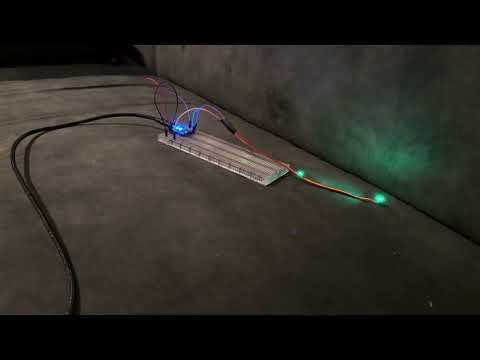
The community fits the Reachy Mini with glowing, expressive eyes. Two projects lead the way; plug the USB kit in and the dashboard grows an Eyes panel.

ESP32 eyes demo

ESP32 eyes

by Tom Mulder

WiFi LED eyes on an ESP32: a REST API, pre-built emotions (joy, anger, amazement), mDNS discovery, and Reachy can drive its own gaze from the conversation app.

ESP32 / S2 / S3 / C3 2x WS2812 REST API mDNS · rmeyes.local
Reachy Mini Eyes demo

Reachy Eyes

by Daniel Ritchie, Brainwave Collective

One of the first eye kits for the Reachy Mini: a USB module with an LED behind each lens, ready-made or DIY. The dashboard auto-detects it and drives colors, moods and effects.

USB plug and play WS2812 Auto-detected DIY or ready-made

Capabilities

Everything it did, and everything it never could

Every page of the removed dashboard, unchanged. Plus the features it always deserved.

Daemon Control

Start and stop the robot backend, wake it up or send it to sleep, watch its live status, from the topbar of every page.

Live Camera

Two ways to watch: direct MJPEG (zero re-encode, the robot’s own JPEG frames) or the daemon’s WebRTC stream. Pause, snapshot, pick your frame rate, go fullscreen.

3D Digital Twin

When the camera is off, a live 3D model of your robot takes the stage: URDF meshes driven by the daemon’s joint stream at 20 Hz, with 40 generated skins to dress it up.

Move Player

Play the dance and emotion libraries, stop them mid-move, and preview each one with an animated 3D thumbnail before you fire it.

App Store

Browse official and community apps, search with typo tolerance, sort by name, author or ♥, and install, private Hugging Face Spaces included.

Apps Manager

List installed apps, start, stop, update or remove them, with the install logs streaming live over WebSocket.

Live Log Panel

A slide-in console: colour-coded levels, timestamps, level filters and text search, pause, copy and clear, while the rest of the dashboard stays visible.

Themes & Palettes

Light and dark, following your system by default, plus twelve palettes, each with its own typeface. Yes, there is a Matrix one.

Eight Languages

English, French, Spanish, German, Italian, Portuguese, Japanese and Arabic, right-to-left included.

Sound & Login

Speaker and microphone levels in the topbar, and Hugging Face login (OAuth or token) with your avatar right there.

Wifi, Updates & Cache

On wireless robots the full settings page is back: scan and join networks, run OTA updates, clear the caches.

Works Offline

Only the store needs the internet. Lose your connection and the robot, the camera, the moves and the logs all keep working.

Updates

Changelog

View older versions